Bitnova ERP: The All-in-One Business Management System Built for Kenyan Companies in 2026
Running a business in Kenya today means juggling multiple systems: one for sales, another for inventory, a spreadsheet for payroll, WhatsApp for customer follow-ups, and M-Pesa statements for reconciliation.
Bitnova ERP changes that. It’s an all-in-one enterprise resource planning (ERP) platform designed for Kenyan businesses, bringing sales, inventory, payroll, CRM, procurement, and M-Pesa payments into a single, easy-to-use system.
If you’re tired of disconnected tools and manual processes, Bitnova ERP is built to help you run your business faster, smarter, and with full visibility.
What Is Bitnova ERP?
Bitnova ERP is a cloud-based business management platform that centralizes your core operations so you can:
-
Track sales and purchases in real time
-
Manage stock across multiple locations
-
Run payroll with Kenyan statutory deductions
-
Follow up on leads and deals in a built-in CRM
-
Reconcile M-Pesa payments automatically
Instead of paying for separate software for accounting, inventory, HR, and CRM, Bitnova ERP combines them into one integrated system with a single login.
It’s designed for SMEs and growing businesses in retail, distribution, services, manufacturing, and more—especially those that need M-Pesa integration and local compliance out of the box.
Why Kenyan Businesses Are Choosing Bitnova ERP
1. One System for Your Entire Business
Most businesses end up with:
-
One tool for invoicing
-
Another for stock
-
Excel for payroll
-
Notebooks or WhatsApp for customer tracking
Bitnova ERP replaces all of that with a single source of truth for your operations. Finance, sales, inventory, HR, and CRM all talk to each other, so you avoid double entry, errors, and conflicting reports.
2. Built for Kenya: M-Pesa, Taxes, and Local Compliance
Kenyan businesses have unique needs. Bitnova ERP is built with those in mind:
-
M-Pesa integration for automated payment reconciliation
-
Support for KRA eTIMS and local tax requirements
-
Payroll modules that handle PAYE, NHIF, NSSF and other statutory deductions
-
Local currency (KES) and Kenyan reporting formats
This local focus means less custom work and fewer headaches during audits or tax season.
3. Real-Time Visibility and Smarter Decisions
With Bitnova ERP, you’re not guessing how your business is performing. You get:
-
Live dashboards for sales, expenses, and cash flow
-
Inventory levels across branches or warehouses
-
Profitability by product, customer, or project
-
Outstanding receivables and payables at a glance
Managers and owners can make decisions based on real data, not last month’s spreadsheet.
4. Scalable as You Grow
Bitnova ERP is modular, meaning you can:
-
Start with core modules like finance, inventory, and sales
-
Add HR/payroll, CRM, procurement, or projects as you expand
-
Support multiple users, branches, and roles with proper access controls
Whether you’re a 5-person startup or a 100+ employee company, the system scales with you without forcing a costly migration to a new platform.
5. Affordable and Practical for SMEs
Enterprise ERPs like SAP or Oracle can be prohibitively expensive for small and medium businesses. Bitnova ERP is positioned as a practical, affordable alternative for Kenyan SMEs, focusing on:
-
Essential features you actually use
-
Local integrations (M-Pesa, eTIMS, banks)
-
Simple pricing without complex per-module licensing surprises
This makes advanced business management accessible to more companies, not just large corporations.
Core Modules of Bitnova ERP
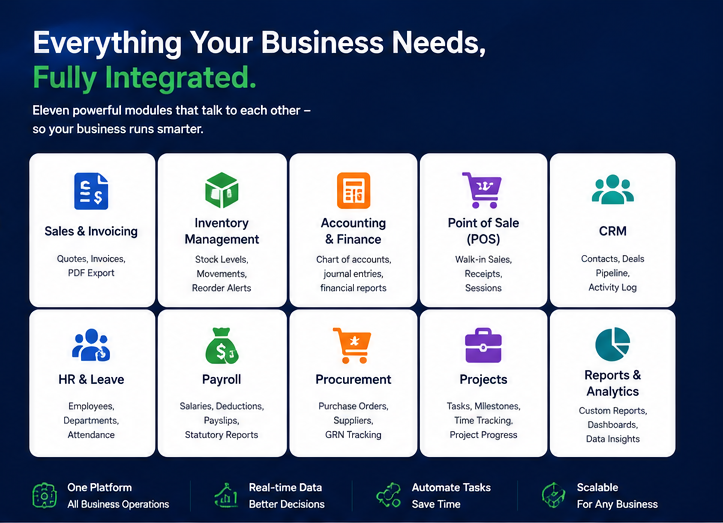
Bitnova ERP covers the key areas most Kenyan businesses need to manage daily.
Finance & Accounting
-
General ledger, journals, and chart of accounts
-
Accounts receivable and payable
-
Bank reconciliation (including M-Pesa statements)
-
Budgeting and financial reporting
-
Tax-ready reports for KRA and auditors
This module gives you a clear view of your financial health and simplifies compliance.
Sales & CRM
-
Customer database with full interaction history
-
Lead and opportunity tracking
-
Quotations, sales orders, and invoices
-
Sales pipeline and revenue forecasting
-
Follow-up reminders and task management
Your sales team can move leads from “interested” to “paid” without leaving the system.
Inventory & Warehouse Management
-
Multi-location stock tracking
-
Purchase orders and supplier management
-
Stock adjustments, transfers, and returns
-
Low-stock alerts and reorder points
-
Item-wise profitability analysis
Ideal for retailers, wholesalers, distributors, and manufacturers who need tight control over stock.
Payroll & HR Management
-
Employee records and contracts
-
Attendance and leave management
-
Payroll processing with PAYE, NHIF, NSSF deductions
-
Payslip generation and reports
-
Basic performance and appraisal tracking
This reduces HR admin time and ensures you stay compliant with Kenyan labor regulations.
Procurement & Supplier Management
-
Purchase requisitions and approvals
-
Supplier database and price lists
-
Purchase orders and goods receipt notes
-
Three-way matching (PO, GRN, invoice)
-
Spend analysis by supplier or category
Helps you control costs and avoid unauthorized purchases.
Projects & Operations (where applicable)
-
Project budgets and cost tracking
-
Task assignments and timelines
-
Timesheets and resource allocation
-
Project-wise profitability reports
Useful for agencies, contractors, and service firms running multiple client projects.
Who Should Use Bitnova ERP?
Bitnova ERP is designed for any business that wants to move beyond spreadsheets and disconnected tools.
Ideal For:
-
Retail shops and supermarkets managing stock, sales, and suppliers
-
Wholesalers and distributors with multiple products and customers
-
Service companies tracking projects, time, and invoices
-
Manufacturers managing production, BOMs, and raw materials
-
Schools and training institutes handling fees, admissions, and expenses
-
NGOs and churches managing donations, projects, and payroll
If your business has more than a handful of transactions per month, Bitnova ERP can save you time and reduce errors.
Bitnova ERP vs Spreadsheets and Basic Tools
If you’ve ever lost hours fixing a broken Excel file or reconciling M-Pesa manually, you already know the pain Bitnova ERP solves.
How Bitnova ERP Works in Practice
Scenario 1: Retail Shop with Multiple Branches
-
All sales from each branch are recorded in Bitnova ERP via POS or invoices.
-
Inventory levels update automatically as items are sold or received.
-
The owner views a consolidated dashboard showing sales, stock, and cash flow across all branches.
-
Reorders are triggered when stock hits minimum levels, reducing stockouts and overstocking.
Result: better stock control, fewer lost sales, and clear visibility for the owner.
Scenario 2: Service Company Running Projects
-
Sales team logs leads and converts them to projects in CRM.
-
Project managers create project budgets and assign tasks.
-
Staff log time against tasks; finance uses this for client billing and payroll.
-
Management sees project profitability in real time and can adjust resourcing.
Result: no more “we think this project is profitable” guesses—just data.
Scenario 3: School or Training Institute
-
Admissions team registers students and links them to classes.
-
Finance generates fee invoices and tracks payments (including M-Pesa).
-
HR manages teaching and admin staff payroll.
-
Leadership views reports on fee collection, outstanding balances, and expenses.
Result: streamlined operations and improved cash flow management.
Key Features of Bitnova ERP
-
Unified platform: Finance, sales, inventory, HR, CRM, and more in one system
-
M-Pesa integration: Automatic or semi-automatic payment reconciliation
-
Kenya-ready compliance: Support for KRA eTIMS, PAYE, NHIF, NSSF, and local reportingnexprobusinesssolutions.co+1
-
Real-time dashboards: Live insights into sales, stock, cash flow, and profits
-
Multi-user & role-based access: Secure access for staff, managers, and accountants
-
Cloud-based access: Work from anywhere on laptop or mobile browser
-
Scalable modules: Add functionality as your business grows
Getting Started with Bitnova ERP
Implementing an ERP can sound intimidating, but Bitnova ERP is designed to be practical and step-by-step.
Typical Implementation Steps
-
Discovery & Planning
-
Map your current processes (sales, purchases, payroll, etc.)
-
Identify pain points and priority areas
-
-
Configuration
-
Set up chart of accounts, tax rules, and users
-
Configure inventory items, customers, and suppliers
-
Customize workflows and approval limits
-
-
Data Migration
-
Import opening balances, customer/supplier lists, and stock
-
Clean up old data before migration
-
-
Training
-
Train finance, sales, store, and HR teams on their modules
-
Provide simple SOPs for daily tasks
-
-
Go-Live & Support
-
Start using Bitnova ERP for live transactions
-
Monitor, tweak, and optimize as you go
-
Many businesses start with a core set of modules (e.g., finance + inventory + sales) and expand over time.
Frequently Asked Questions
Is Bitnova ERP suitable for small businesses?
Yes. Bitnova ERP is designed for SMEs and growing companies that need more structure than spreadsheets but don’t want the cost and complexity of enterprise systems. You can start small and add modules as you grow.
Does Bitnova ERP integrate with M-Pesa?
Yes. M-Pesa integration is a key feature, allowing you to:
-
Record M-Pesa payments directly against invoices
-
Reconcile M-Pesa statements with system transactions
-
Reduce manual errors and speed up cash application
This is especially valuable for businesses with high M-Pesa transaction volumes.
Can Bitnova ERP handle multiple branches or locations?
Yes. Bitnova ERP supports multi-branch and multi-location setups, enabling you to:
-
Track inventory per branch or warehouse
-
Generate branch-wise sales and profit reports
-
Consolidate data for head office reporting
Is my data secure in Bitnova ERP?
Bitnova ERP uses secure, encrypted connections and role-based access controls to protect your data. Regular backups and proper user management further reduce risk. For specific hosting and security details, you can consult Bitnova’s team directly.
How long does it take to implement Bitnova ERP?
Implementation time depends on your business size and complexity. Typical timelines:
-
Small businesses: 2–6 weeks for core modules
-
Medium businesses: 6–12 weeks with more customization and data migration
A phased rollout (starting with finance and inventory) often works best.
Ready to Modernize Your Business with Bitnova ERP?
In a competitive market, the businesses that win are those that run on data, not guesswork.
Bitnova ERP gives Kenyan companies a modern, integrated platform to manage finance, sales, inventory, HR, and CRM—while staying aligned with local realities like M-Pesa, KRA eTIMS, and statutory payroll requirements.

Comments (0)
💬
No comments yet. Be the first!